Let's make the RGB triangle again
But why? We already made it in the last chapter.
Well, I created this chapter because I made a promise earlier in the chapter Draw Multiple Points. There, I mentioned that if gl.vertexAttribPointer didn’t make complete sense at the time, I would explain it in detail in the RGB Triangle II chapter.
So here we are — I’m keeping that promise, and in this chapter we’ll finally break it down properly.
In the last chapter, we used two separate buffers to draw the RGB triangle — one for the vertex coordinates (vec2) and another for the vertex colors (vec3). But can we do the same thing using a single buffer?
The answer is yes, and that’s exactly what we’re going to explore in this chapter.
Both the coordinate data and the color data use the same data type, gl.FLOAT. And since a buffer is just a block of memory on the GPU, there’s no reason we can’t place both kinds of data together in that memory.
The only thing the GPU needs to know is how to read the data correctly — that is to say which parts represent vertex coordinates and which parts represent vertex colors.
And if you recall, that’s exactly what gl.vertexAttribPointer function is used for.
Let's merge the data of the buffers
Coordinate data:
const vertexCoordinates = [
  0, 0.5, // First vertex
  -0.5, -0.5, // Second vertex
  0.5, -0.5, // Third vertex
];
Color data:
const vertexColor = [
  1, 0, 0, // first vertex color
  0, 1, 0, // second vertex color
  0, 0, 1 // third vertex color
];
Now one way to merge the data is to simply put full vertex data ( coordinate + color ) together something like the illustration:
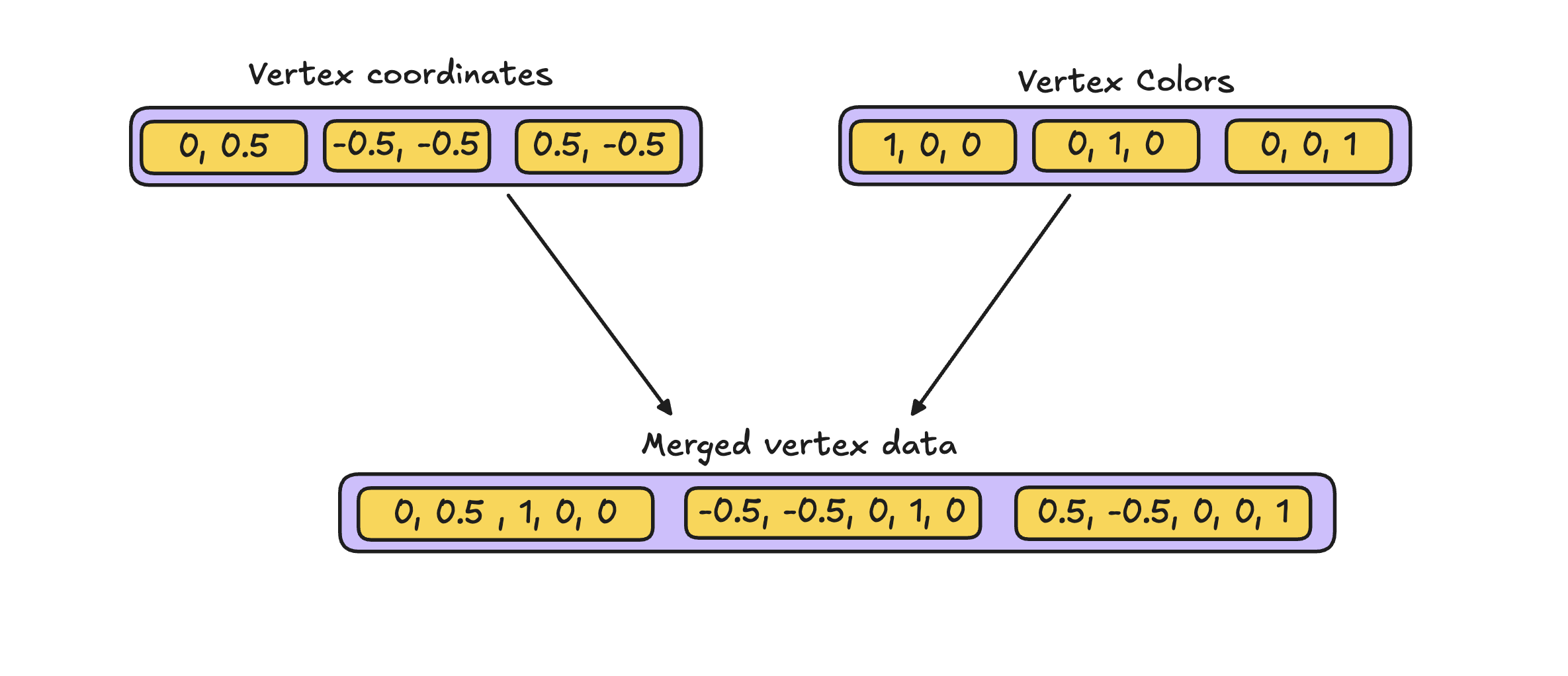
So now you make a single array with both the things together:
const vertexCoordinatesAndColors = [
  0.0,  0.5,  1.0, 0.0, 0.0,  // Vertex 1 → (x, y) + (r, g, b)
 -0.5, -0.5,  0.0, 1.0, 0.0,  // Vertex 2 → (x, y) + (r, g, b)
  0.5, -0.5,  0.0, 0.0, 1.0,  // Vertex 3 → (x, y) + (r, g, b)
];
Once you make this array follow the steps in the Draw Multiple Points chapter to make a buffer and pass the data to the buffer.
Now we need to understand how we can help GPU to interpret the data.
How to let GPU know which data corresponds to which attribute inside a buffer?
A buffer is just a flat, continuous block of bytes.
It does not know anything about vertices or attributes — that meaning comes only from how we interpret the data.
So, to read the data for one attribute of one vertex, the GPU needs three things.
1. Which vertex are we talking about?
Let’s say we want the data for the i-th vertex.
2. How far apart are two consecutive vertices in memory? (Stride, the second last arg of gl.vertexAttribPointer)
The stride tells the GPU how many bytes to skip to move from:
- vertex
i→ vertexi + 1
Example:
Each vertex stores:
- vertex coordinate
(x, y)→ 2 floats - vertex color
(r, g, b)→ 3 floats
That’s 5 floats per vertex.
Since:
1 float = 4 bytes
stride = 5 × 4 = 20 bytes
3. Where does this attribute start inside a vertex? (Offset, the last arg of gl.vertexAttribPointer)
Inside each vertex:
- vertex coordinate starts at byte
0 - vertex color starts after 2 floats →
2 × 4 = 8 bytes
So:
- vertex coordinate offset =
0 - vertex color offset =
8
NOTE: Stride and offset are in bytes not in the number of floats
The core formula
To find where the GPU should start reading for an attribute:
start_address = i × stride + offset
Meaning:
i × stride→ jump to the start of vertexi+ offset→ jump to the attribute inside that vertex
Once the GPU knows where to start reading (using i × stride + offset), the next question is simple:
How many bytes should be read from that position?
This is determined by the size of the attribute.
For example, if the attribute type is vec3, then it has 3 components,
But how does GPU know about that?
GPU gets to know about that from the size we pass into the gl.vertexAttribPointer.
NOTE: Stride and offset are to be passed as number of bytes but the size is to be passed as number of components not bytes.
Let's see the gl.vertexAttribPointer function:
gl.vertexAttribPointer(
  attribLocation,
  size,      // number of components
  gl.FLOAT,
  false,
  stride,
  offset
);
With all this in place, writing the gl.vertexAttribPointer calls becomes straightforward.
We just describe:
- where each vertex starts (stride),
- where each attribute starts inside the vertex (offset),
- and how many components each attribute has (size).
Now let’s write the actual gl.vertexAttribPointer calls for the vertex coordinates and the vertex colors.
gl.vertexAttribPointer(a_position_location, 2, gl.FLOAT, false, 5*4 , 0);
gl.vertexAttribPointer(a_color_location, 3, gl.FLOAT, false, 5 * 4, 2 * 4);
Final Code
script.js
//Step 1: Set the viewport
const canvas = document.querySelector("canvas");
const gl = canvas.getContext("webgl2");
canvas.height = window.innerHeight; // For making the canvas full screen
canvas.width = window.innerWidth; // For making the canvas full screen
gl.viewport(0, 0, canvas.width, canvas.height);
gl.clearColor(0, 0, 0, 1);
gl.clear(gl.COLOR_BUFFER_BIT);
//Step 2: Write the shaders
// vertex shader
const vertexShaderSource = `#version 300 es
in vec2 a_position;
in vec3 a_color;
out vec3 frag_color;
void main(){
  gl_Position = vec4(a_position,0,1);
  gl_PointSize = 30.0;
  frag_color = a_color;
}`;

// fragment shader
const fragmentShaderSource = `# version 300 es
precision mediump float;
in vec3 frag_color;
out vec4 color;
void main(){
  color = vec4(frag_color,1);
}`;

// Step 3: Compile the shaders
const vertexShader = utilCreateShader(gl, gl.VERTEX_SHADER, vertexShaderSource);

const fragmentShader = utilCreateShader(
  gl,
  gl.FRAGMENT_SHADER,
  fragmentShaderSource
);

// Step 4: Create a WebGL program
const program = utilCreateProgram(gl, vertexShader, fragmentShader);

const vertexCoordinatesAndColors = [
  0.0,  0.5,  1.0, 0.0, 0.0,  // Vertex 1 → (x, y) + (r, g, b)
 -0.5, -0.5,  0.0, 1.0, 0.0,  // Vertex 2 → (x, y) + (r, g, b)
  0.5, -0.5,  0.0, 0.0, 1.0,  // Vertex 3 → (x, y) + (r, g, b)
];

const a_position_location = gl.getAttribLocation(program, "a_position");
const a_color_location = gl.getAttribLocation(program, "a_color");

// Step 7: Use the WebGL program
gl.useProgram(program);
const pointsBuffer = utilCreateBuffer(gl, vertexCoordinatesAndColors);
gl.vertexAttribPointer(a_position_location, 2, gl.FLOAT, false, 5*4 , 0);
gl.enableVertexAttribArray(a_position_location);
gl.vertexAttribPointer(a_color_location, 3, gl.FLOAT, false, 5 * 4, 2 * 4);
gl.enableVertexAttribArray(a_color_location);

// Step 8: Issue the draw call
gl.drawArrays(gl.TRIANGLES, 0, 3);